Ruler: A Playful Green Typeface for Creative Projects
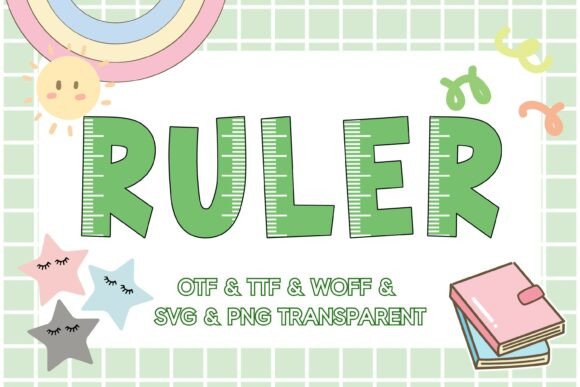
There's something instantly nostalgic about a classic green ruler. That familiar ridged edge, the bold numbers, the sense of precision mixed with childhood creativity—it's a visual shorthand for learning, making, and organized fun. The Ruler font captures that exact energy and transforms it into a versatile color typeface that designers and creators are using to inject personality into everything from classroom materials to brand identities.
Unlike standard monochrome fonts, Ruler is an OpenType-SVG color font, meaning the letters arrive with built-in shading, texture, and that signature green hue right out of the box. You're not just getting letterforms; you're getting a complete visual element that mimics the tactile quality of a real plastic ruler. The characters feature subtle dimensionality, with highlights and shadows that give each letter a slightly three-dimensional appearance. It's the kind of detail that makes a design feel considered and crafted without requiring hours of manual editing.
Where This Typeface Truly Shines
The beauty of a display font like Ruler lies in its specificity. It's not trying to be everything to everyone—and that's precisely why it works so well for certain applications. Think about the last time you saw a design that made you smile before you even read the words. That's the reaction Ruler tends to provoke.
Educational materials are the most obvious home for this typeface. Teachers creating bulletin board headers, worksheet titles, or classroom signage will find that Ruler immediately sets the right tone. It signals "school" without being childish, and "organized" without being sterile. The font pairs beautifully with clean sans serif body text, creating a hierarchy that's both functional and visually engaging.
But the applications stretch far beyond the classroom door. Small business owners in the stationery, craft supply, or children's product space have discovered that Ruler works brilliantly on packaging. Imagine a set of colored pencils or a DIY craft kit with "Create Something Amazing" set in this typeface across the front of the box. The font does half the branding work before the customer reads a single product description.
Practical Applications Across Design Disciplines
Social media managers looking for scroll-stopping graphics have found a reliable ally in this creative font. Instagram posts, Pinterest pins, and Facebook headers benefit enormously from typography that carries visual weight without additional design elements. A quote about learning or creativity set in Ruler against a simple background can outperform heavily designed graphics because the typeface itself becomes the focal point.
For bloggers and content creators, this opens up interesting possibilities. A heading set in Ruler on an education-focused blog post, a tutorial header, or a newsletter banner immediately communicates the subject matter through visual association. Readers process the playful, school-inspired aesthetic before they've consciously registered the words, which primes them for the content that follows.
Print materials deserve attention too. Event invitations for school fundraisers, children's birthday parties, or back-to-school promotions benefit from typography that feels thematic without being cartoonish. Ruler strikes that balance—it's fun enough for a kids' event but polished enough for a PTA fundraiser or a tutoring service brochure. The font maintains its charm whether it's printed large on a poster or scaled down on a flyer.
Merchandise designers have also embraced this typeface for t-shirts, tote bags, stickers, and notebooks. The educational aesthetic resonates with teachers, students, and parents alike, making it a natural fit for products marketed to that audience. Because the font includes color information built in, the design process is streamlined—you're not adding color overlays or effects after the fact.
Working With Color Font Files
One important consideration with Ruler is its format. As an OpenType-SVG color font, it behaves differently from standard OTF or TTF typefaces. The color and texture are embedded directly into the font file, which means compatible applications render the full visual effect automatically. Photoshop, Illustrator, Silhouette, and Inkscape all support this format, giving you flexibility across your design toolkit.
It's worth noting that standard OTF and TTF versions of this font won't display the color effects in applications that don't support OpenType-SVG rendering. If you're working in Cricut Design Space, for instance, the OTF and TTF files won't behave as expected. However, the included SVG and high-resolution transparent PNG files at 300 pixels provide excellent alternatives for those workflows. You can import the PNG directly into your cutting software or use the SVG for scalable vector work.
This multi-format approach is something more premium font packages are offering now, and for good reason. Designers work across multiple platforms and need assets that travel well. Having the font available in OTF, TTF, WOFF, SVG, and PNG means you're covered whether you're building a website, printing a poster, or cutting vinyl decals.
Pairing Ruler With Other Typefaces
No display font exists in isolation. The real power of a typeface like Ruler comes from how you combine it with supporting typography. Because Ruler is bold, colorful, and textured, it demands a quieter partner for body text and secondary information.
A clean sans serif like Montserrat, Open Sans, or Lato provides an excellent counterbalance. These typefaces are legible at small sizes and don't compete visually with Ruler's personality. For projects that need a slightly warmer feel, a simple handwritten font for subheadings can bridge the gap between Ruler's playful energy and the practicality of body copy.
Avoid pairing Ruler with other highly decorative or textured fonts. Two competing display typefaces create visual noise rather than visual interest. The goal is contrast—let Ruler be the star of the headline while supporting fonts handle the informational heavy lifting.
Brand Identity and Commercial Considerations
For entrepreneurs building a brand identity, choosing a typeface isn't just an aesthetic decision—it's a strategic one. Ruler works best for brands whose personality leans toward approachable, educational, creative, or family-friendly. A tutoring company, a children's book author, a teacherpreneur selling classroom resources, or a stationery brand could all build recognizable visual identities around this typeface.
The key is consistency. If Ruler becomes your headline font, use it across all primary touchpoints—logo design, website headers, social media templates, packaging, and print collateral. This repetition builds brand recognition. Your audience begins to associate that distinctive green ruler aesthetic with your business before they even read your name.
Before committing to any creative font for commercial use, review the licensing terms carefully. Ensure the font's license covers your intended applications, whether that's digital products, printed merchandise, or client work. Most reputable font designers provide clear licensing information, and respecting those terms protects both your business and the creative professionals who produce these design assets.
Ruler isn't a font you'll use for every project, and that's exactly as it should be. The most effective typographic choices are specific ones—typefaces chosen because they align with a project's goals, audience, and personality rather than because they're trendy or universally "safe." When the brief calls for something that feels tactile, educational, cheerful, and unmistakably playful, this green ruler-inspired typeface delivers a visual punch that generic alternatives simply can't match.